Annotations
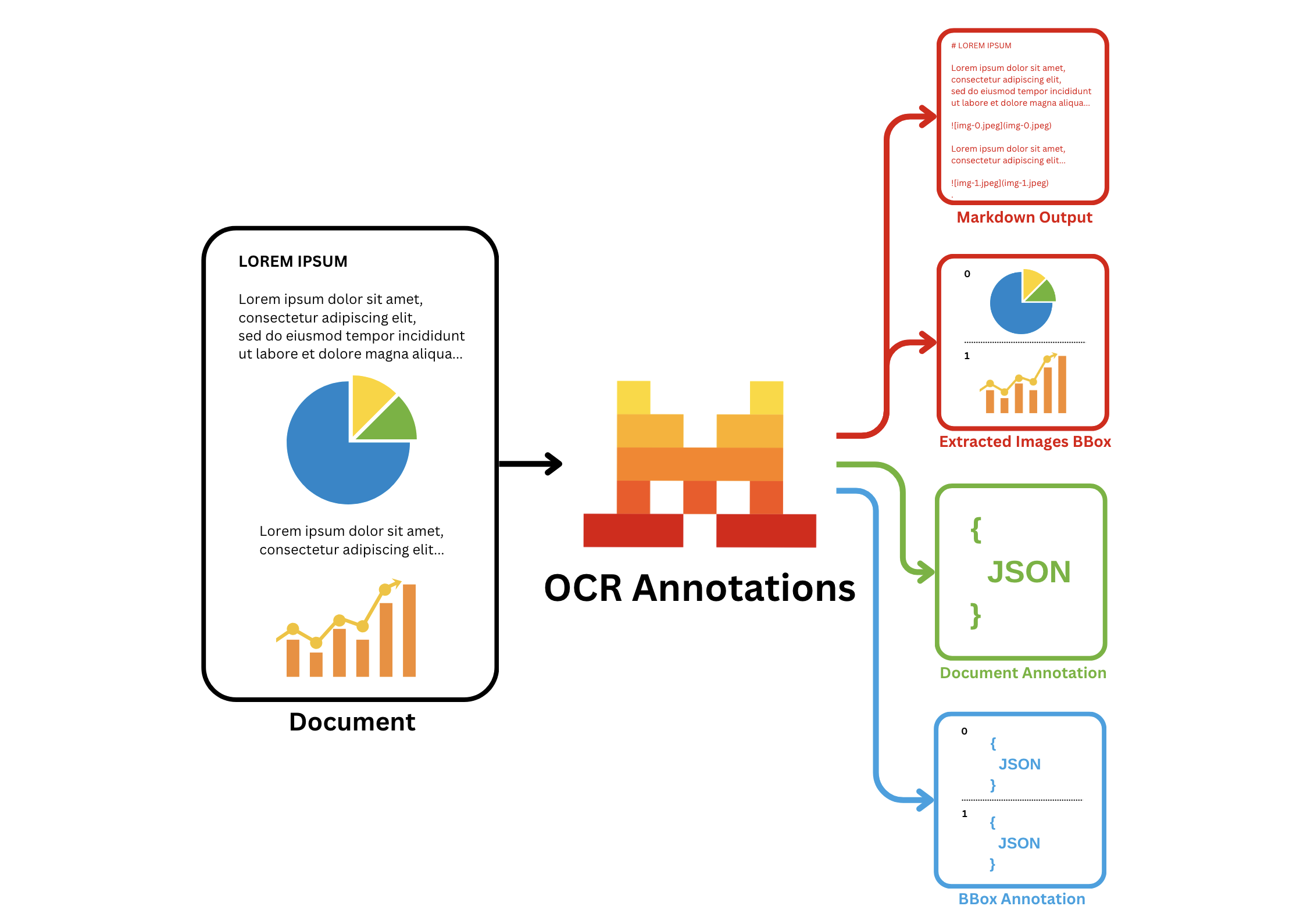
In addition to the basic OCR functionality, Mistral Document AI API adds the annotations functionality, which allows you to extract information in a structured json-format that you provide. Specifically, it offers two types of annotations:
bbox_annotation: gives you the annotation of the bboxes extracted by the OCR model (charts/ figures etc) based on user requirement and provided bbox/image annotation format. The user may ask to describe/caption the figure for instance.document_annotation: returns the annotation of the entire document based on the provided document annotation format.
Key capabilities:
- Labeling and annotating data
- Extraction and structuring of specific information from documents into a predefined JSON format
- Automation of data extraction to reduce manual entry and errors
- Efficient handling of large document volumes for enterprise-level applications
Common use cases:
- Parsing of forms, classification of documents, and processing of images, including text, charts, and signatures
- Conversion of charts to tables, extraction of fine print from figures, or definition of custom image types
- Capture of receipt data, including merchant names and transaction amounts, for expense management.
- Extraction of key information like vendor details and amounts from invoices for automated accounting.
- Extraction of key clauses and terms from contracts for easier review and management
How it works
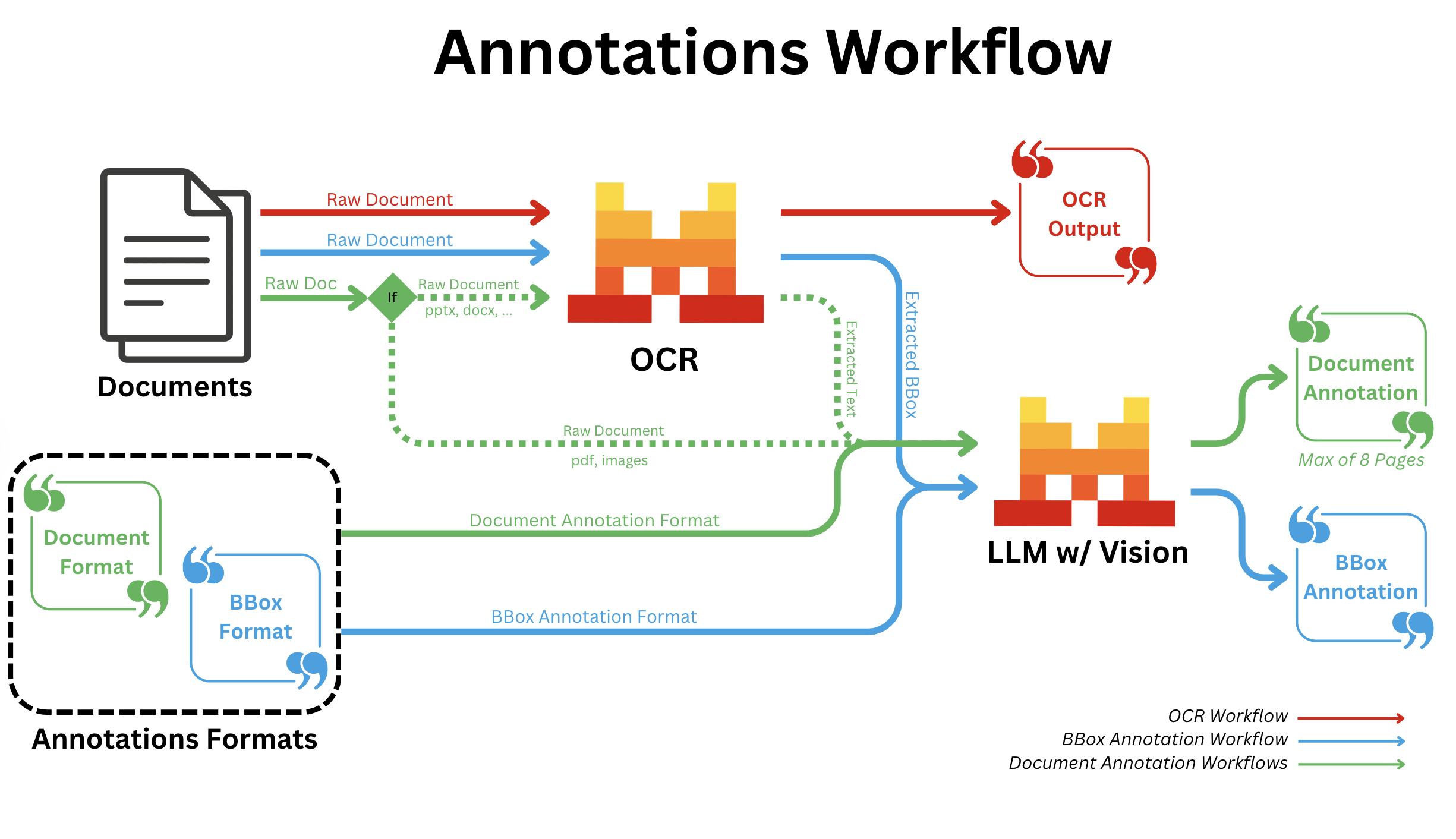
BBOX Annotations
- All document types:
- After regular OCR is finished; we call a Vision capable LLM for all bboxes individually with the provided annotation format.
Document Annotation
- pdf/image:
- Independent of OCR; we convert all pages into images and send all images to a Vision capable LLM along with the provided annotation format.
- pptx/docx/...:
- We run OCR first and send the output text markdown to a Vision capable LLM along with the provided annotation format.
You can use our API with the following document formats:
- OCR with pdf
- OCR with uploaded pdf
- OCR with image: even from low-quality or handwritten sources.
- scans, DOCX, PPTX.
In these examples, we will only consider the OCR with pdf format.
BBox Annotation
- python
- typescript
- curl
Here is an example of how to use our Annotation functionalities using the Mistral AI client and Pydantic:
Define the Data Model
First, define the response formats for BBox Annotation using Pydantic models:
from pydantic import BaseModel

# BBOX Annotation response formats
class Image(BaseModel):
  image_type: str
  short_description: str
  summary: str
You can also provide a description for each entry, the description will be used as detailed information and instructions during the annotation; for example:
from pydantic import BaseModel, Field

# BBOX Annotation response formats
class Image(BaseModel):
  image_type: str = Field(..., description="The type of the image.")
  short_description: str = Field(..., description="A description in english describing the image.")
  summary: str = Field(..., description="Summarize the image.")
Start the completion
Next, use the Mistral AI python client to make a request and ensure the response adheres to the defined structures using bbox_annotation_format set to the corresponding pydantic models:
import os
from mistralai import Mistral, DocumentURLChunk, ImageURLChunk, ResponseFormat
from mistralai.extra import response_format_from_pydantic_model

api_key = os.environ["MISTRAL_API_KEY"]

client = Mistral(api_key=api_key)

# Client call
response = client.ocr.process(
    model="mistral-ocr-latest",
    document=DocumentURLChunk(
      document_url="https://arxiv.org/pdf/2410.07073"
    ),
    bbox_annotation_format=response_format_from_pydantic_model(Image),
    include_image_base64=True
  )
Here is an example of how to use our Annotation functionalities using the Mistral AI client and Zod:
Define the Data Model
First, define the response formats for BBox Annotation using Zod schemas:
import { z } from 'zod';

// BBOX Annotation response formats
const ImageSchema = z.object({
  image_type: z.string(),
  short_description: z.string(),
  summary: z.string(),
});
You can also provide a description for each entry, the description will be used as detailed information and instructions during the annotation; for example:
import { z } from 'zod';

// Define the schema for the Image type
const ImageSchema = z.object({
  image_type: z.string().describe("The type of the image."),
  short_description: z.string().describe("A description in English describing the image."),
  summary: z.string().describe("Summarize the image."),
});
Start the completion
Next, use the Mistral AI typescript client to make a request and ensure the response adheres to the defined structure using bbox_annotation_format set to the corresponding Zod schema:
import { Mistral } from "@mistralai/mistralai";
import { responseFormatFromZodObject } from '@mistralai/mistralai/extra/structChat.js';

const apiKey = process.env.MISTRAL_API_KEY;

const client = new Mistral({ apiKey: apiKey });

async function processDocument() {
  try {
    const response = await client.ocr.process({
      model: "mistral-ocr-latest",
      document: {
        type: "document_url",
        documentUrl: "https://arxiv.org/pdf/2410.07073"
      },
      bboxAnnotationFormat: responseFormatFromZodObject(ImageSchema),
      includeImageBase64: true,
    });

    console.log(response);
  } catch (error) {
    console.error("Error processing document:", error);
  }
}

processDocument();
The request is structured to ensure that the response adheres to the specified custom JSON schema. The schema defines the structure of a bbox_annotation object with image_type, short_description and summary properties.
curl --location 'https://api.mistral.ai/v1/ocr' \
--header 'Content-Type: application/json' \
--header "Authorization: Bearer ${MISTRAL_API_KEY}" \
--data '{
    "model": "mistral-ocr-latest",
    "document": {"document_url": "https://arxiv.org/pdf/2410.07073"},
    "bbox_annotation_format": {
        "type": "json_schema",
        "json_schema": {
            "schema": {
                "properties": {
                    "document_type": {"title": "Document_Type", "type": "string"},
                    "short_description": {"title": "Short_Description", "type": "string"},
                    "summary": {"title": "Summary", "type": "string"}
                },
                "required": ["document_type", "short_description", "summary"],
                "title": "BBOXAnnotation",
                "type": "object",
                "additionalProperties": false
            },
            "name": "document_annotation",
            "strict": true
        }
    },
    "include_image_base64": true
}'
You can also add a description key in your properties object. The description will be used as detailed information and instructions during the annotation; for example:
curl --location 'https://api.mistral.ai/v1/ocr' \
--header 'Content-Type: application/json' \
--header "Authorization: Bearer ${MISTRAL_API_KEY}" \
--data '{
    "model": "mistral-ocr-latest",
    "document": {"document_url": "https://arxiv.org/pdf/2410.07073"},
    "bbox_annotation_format": {
        "type": "json_schema",
        "json_schema": {
            "schema": {
                "properties": {
                    "document_type": {"title": "Document_Type", "description": "The type of the image.", "type": "string"},
                    "short_description": {"title": "Short_Description", "description": "A description in English describing the image.", "type": "string"},
                    "summary": {"title": "Summary", "description": "Summarize the image.", "type": "string"}
                },
                "required": ["document_type", "short_description", "summary"],
                "title": "BBOXAnnotation",
                "type": "object",
                "additionalProperties": false
            },
            "name": "document_annotation",
            "strict": true
        }
    },
    "include_image_base64": true
}'
Example output
BBOX Image
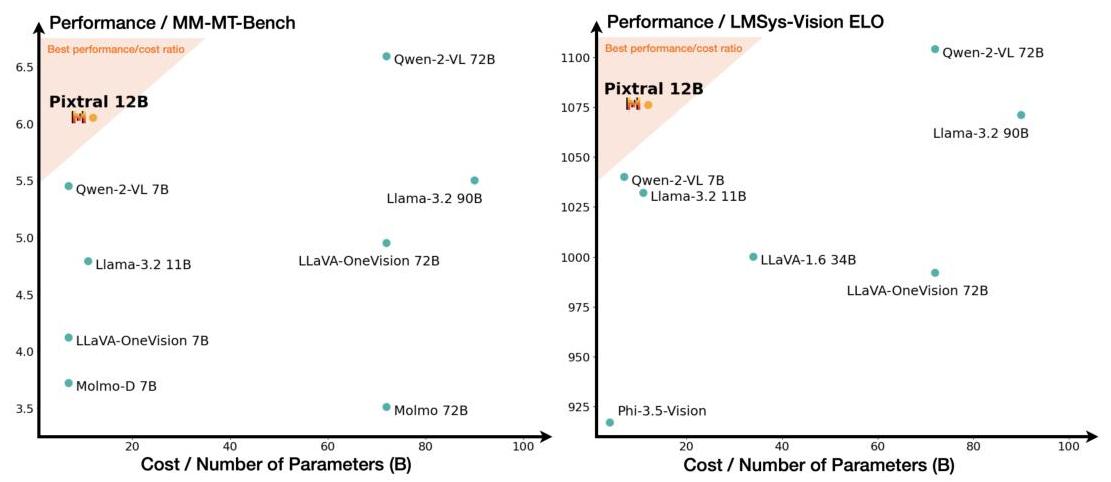
Image Base 64
{
  "image_base64": "data:image/jpeg;base64,/9j/4AAQSkZJRgABAQAAAQABAAD/2wBDAAgGB{LONG_MIDDLE_SEQUENCE}KKACiiigAooooAKKKKACiiigD//2Q=="
}
BBOX Annotation Output
{
  "image_type": "scatter plot",
  "short_description": "Comparison of different models based on performance and cost.",
  "summary": "The image consists of two scatter plots comparing various models on two different performance metrics against their cost or number of parameters. The left plot shows performance on the MM-MT-Bench, while the right plot shows performance on the LMSys-Vision ELO. Each point represents a different model, with the x-axis indicating the cost or number of parameters in billions (B) and the y-axis indicating the performance score. The shaded region in both plots highlights the best performance/cost ratio, with Pixtral 12B positioned within this region in both plots, suggesting it offers a strong balance of performance and cost efficiency. Other models like Qwen-2-VL 72B and Qwen-2-VL 7B also show high performance but at varying costs."
}
Document Annotation
- python
- typescript
- curl
Here is an example of how to use our Document Annotation functionality using the Mistral AI client and Pydantic:
Define the Data Model
First, define the response format for Document Annotation using a Pydantic model:
from pydantic import BaseModel

# Document Annotation response format
class Document(BaseModel):
  language: str
  chapter_titles: list[str]
  urls: list[str]
Start the completion
Next, use the Mistral AI python client to make a request and ensure the response adheres to the defined structures using document_annotation_format set to the corresponding pydantic model:
import os
from mistralai import Mistral, DocumentURLChunk, ImageURLChunk, ResponseFormat
from mistralai.extra import response_format_from_pydantic_model

api_key = os.environ["MISTRAL_API_KEY"]

client = Mistral(api_key=api_key)

# Client call
response = client.ocr.process(
    model="mistral-ocr-latest",
    pages=list(range(8)),
    document=DocumentURLChunk(
      document_url="https://arxiv.org/pdf/2410.07073"
    ),
    document_annotation_format=response_format_from_pydantic_model(Document),
    include_image_base64=True
  )
Here is an example of how to use our Document Annotation functionality using the Mistral AI client and Zod:
Define the Data Model
First, define the response formats for Document Annotation using a Zod schema:
import { z } from 'zod';

// Document Annotation response format
const DocumentSchema = z.object({
  language: z.string(),
  chapter_titles: z.array(z.string()),
  urls: z.array(z.string()),
});
Start the completion
Next, use the Mistral AI typescript client to make a request and ensure the response adheres to the defined structures using document_annotation_format set to the corresponding Zod schema:
import { Mistral } from "@mistralai/mistralai";
import { responseFormatFromZodObject } from '@mistralai/mistralai/extra/structChat.js';

const apiKey = process.env.MISTRAL_API_KEY;

const client = new Mistral({ apiKey: apiKey });

async function processDocument() {
  try {
    const response = await client.ocr.process({
      model: "mistral-ocr-latest",
      pages: Array.from({ length: 8 }, (_, i) => i), // Creates an array [0, 1, 2, ..., 7]
      document: {
        type: "document_url",
        documentUrl: "https://arxiv.org/pdf/2410.07073"
      },
      documentAnnotationFormat: responseFormatFromZodObject(DocumentSchema),
      includeImageBase64: true,
    });

    console.log(response);
  } catch (error) {
    console.error("Error processing document:", error);
  }
}

processDocument();
The request is structured to ensure that the response adheres to the specified custom JSON schema. The schema defines the structure of a document_annotation object with with language, chapter_titles and urls properties.
curl --location 'https://api.mistral.ai/v1/ocr' \
--header 'Content-Type: application/json' \
--header "Authorization: Bearer ${MISTRAL_API_KEY}" \
--data '{
    "model": "mistral-ocr-latest",
    "document": {"document_url": "https://arxiv.org/pdf/2410.07073"},
    "pages": [0, 1, 2, 3, 4, 5, 6, 7],
    "document_annotation_format": {
        "type": "json_schema",
        "json_schema": {
            "schema": {
                "properties": {
                    "language": {"title": "Language", "type": "string"},
                    "chapter_titles": {"title": "Chapter_Titles", "type": "string"},
                    "urls": {"title": "urls", "type": "string"}
                },
                "required": ["language", "chapter_titles", "urls"],
                "title": "DocumentAnnotation",
                "type": "object",
                "additionalProperties": false
            },
            "name": "document_annotation",
            "strict": true
        }
    },
    "include_image_base64": true
}'
Example output
Document Annotation Output
{
  "language": "English",
  "chapter_titles": [
    "Abstract",
    "1 Introduction",
    "2 Architectural details",
    "2.1 Multimodal Decoder",
    "2.2 Vision Encoder",
    "2.3 Complete architecture",
    "3 MM-MT-Bench: A benchmark for multi-modal instruction following",
    "4 Results",
    "4.1 Main Results",
    "4.2 Prompt selection",
    "4.3 Sensitivity to evaluation metrics",
    "4.4 Vision Encoder Ablations"
  ],
  "urls": [
    "https://mistral.ai/news/pixtal-12b/",
    "https://github.com/mistralai/mistral-inference/",
    "https://github.com/mistralai/mistral-evals/",
    "https://huggingface.co/datasets/mistralai/MM-MT-Bench"
  ]
}
BBoxes Annotation and Document Annotation
- python
- typescript
- curl
Here is an example of how to use our Annotation functionalities using the Mistral AI client and Pydantic:
Define the Data Model
First, define the response formats for both BBox Annotation and Document Annotation using Pydantic models:
from pydantic import BaseModel

# BBOX Annotation response format
class Image(BaseModel):
  image_type: str
  short_description: str
  summary: str

# Document Annotation response format
class Document(BaseModel):
  language: str
  chapter_titles: list[str]
  urls: list[str]
You can also provide a description for each entry, the description will be used as detailed information and instructions during the annotation; for example:
from pydantic import BaseModel, Field

# BBOX Annotation response format with description
class Image(BaseModel):
  image_type: str = Field(..., description="The type of the image.")
  short_description: str = Field(..., description="A description in english describing the image.")
  summary: str = Field(..., description="Summarize the image.")

# Document Annotation response format
class Document(BaseModel):
  language: str
  chapter_titles: list[str]
  urls: list[str]
Start the completion
Next, use the Mistral AI python client to make a request and ensure the response adheres to the defined structures using bbox_annotation_format and document_annotation_format set to the corresponding pydantic models:
import os
from mistralai import Mistral, DocumentURLChunk, ImageURLChunk, ResponseFormat
from mistralai.extra import response_format_from_pydantic_model

api_key = os.environ["MISTRAL_API_KEY"]

client = Mistral(api_key=api_key)

# Client call
response = client.ocr.process(
    model="mistral-ocr-latest",
    pages=list(range(8)),
    document=DocumentURLChunk(
      document_url="https://arxiv.org/pdf/2410.07073"
    ),
    bbox_annotation_format=response_format_from_pydantic_model(Image),
    document_annotation_format=response_format_from_pydantic_model(Document),
    include_image_base64=True
  )
Here is an example of how to use our Annotation functionalities using the Mistral AI client and Zod:
Define the Data Model
First, define the response formats for both BBox Annotation and Document Annotation using Zod schemas:
import { z } from 'zod';

// BBOX Annotation response format
const ImageSchema = z.object({
  image_type: z.string(),
  short_description: z.string(),
  summary: z.string(),
});

// Document Annotation response format
const DocumentSchema = z.object({
  language: z.string(),
  chapter_titles: z.array(z.string()),
  urls: z.array(z.string()),
});
You can also provide a description for each entry, the description will be used as detailed information and instructions during the annotation; for example:
import { z } from 'zod';

// Define the schema for the Image type
const ImageSchema = z.object({
  image_type: z.string().describe("The type of the image."),
  short_description: z.string().describe("A description in English describing the image."),
  summary: z.string().describe("Summarize the image."),
});

// Document Annotation response format
const DocumentSchema = z.object({
  language: z.string(),
  chapter_titles: z.array(z.string()),
  urls: z.array(z.string()),
});
Start the completion
Next, use the Mistral AI typescript client to make a request and ensure the response adheres to the defined structures using bbox_annotation_format and document_annotation_format set to the corresponding Zod schemas:
import { Mistral } from "@mistralai/mistralai";
import { responseFormatFromZodObject } from '@mistralai/mistralai/extra/structChat.js';

const apiKey = process.env.MISTRAL_API_KEY;

const client = new Mistral({ apiKey: apiKey });

async function processDocument() {
  try {
    const response = await client.ocr.process({
      model: "mistral-ocr-latest",
      pages: Array.from({ length: 8 }, (_, i) => i), // Creates an array [0, 1, 2, ..., 7]
      document: {
        type: "document_url",
        documentUrl: "https://arxiv.org/pdf/2410.07073"
      },
      bboxAnnotationFormat: responseFormatFromZodObject(ImageSchema),
      documentAnnotationFormat: responseFormatFromZodObject(DocumentSchema),
      includeImageBase64: true,
    });

    console.log(response);
  } catch (error) {
    console.error("Error processing document:", error);
  }
}

processDocument();
The request is structured to ensure that the response adheres to the specified custom JSON schema. The schema defines the structure of a bbox_annotation object with image_type, short_description and summary properties and a document_annotation object with with language, chapter_titles and urls properties.
curl --location 'https://api.mistral.ai/v1/ocr' \
--header 'Content-Type: application/json' \
--header "Authorization: Bearer ${MISTRAL_API_KEY}" \
--data '{
    "model": "mistral-ocr-latest",
    "document": {"document_url": "https://arxiv.org/pdf/2410.07073"},
    "pages": [0, 1, 2, 3, 4, 5, 6, 7],
    "bbox_annotation_format": {
        "type": "json_schema",
        "json_schema": {
            "schema": {
                "properties": {
                    "document_type": {"title": "Document_Type", "type": "string"},
                    "short_description": {"title": "Short_Description", "type": "string"},
                    "summary": {"title": "Summary", "type": "string"}
                },
                "required": ["document_type", "short_description", "summary"],
                "title": "BBOXAnnotation",
                "type": "object",
                "additionalProperties": false
            },
            "name": "document_annotation",
            "strict": true
        }
    },
    "document_annotation_format": {
        "type": "json_schema",
        "json_schema": {
            "schema": {
                "properties": {
                    "language": {"title": "Language", "type": "string"},
                    "chapter_titles": {"title": "Chapter_Titles", "type": "string"},
                    "urls": {"title": "urls", "type": "string"}
                },
                "required": ["language", "chapter_titles", "urls"],
                "title": "DocumentAnnotation",
                "type": "object",
                "additionalProperties": false
            },
            "name": "document_annotation",
            "strict": true
        }
    },
    "include_image_base64": true
}'
You can also add a description key in you properties object. The description will be used as detailed information and instructions during the annotation; for example:
curl --location 'https://api.mistral.ai/v1/ocr' \
--header 'Content-Type: application/json' \
--header "Authorization: Bearer ${MISTRAL_API_KEY}" \
--data '{
    "model": "mistral-ocr-latest",
    "document": {"document_url": "https://arxiv.org/pdf/2410.07073"},
    "bbox_annotation_format": {
        "type": "json_schema",
        "json_schema": {
            "schema": {
                "properties": {
                    "document_type": {"title": "Document_Type", "description": "The type of the image.", "type": "string"},
                    "short_description": {"title": "Short_Description", "description": "A description in English describing the image.", "type": "string"},
                    "summary": {"title": "Summary", "description": "Summarize the image.", "type": "string"}
                },
                "required": ["document_type", "short_description", "summary"],
                "title": "BBOXAnnotation",
                "type": "object",
                "additionalProperties": false
            },
            "name": "document_annotation",
            "strict": true
        }
    },
     "document_annotation_format": {
        "type": "json_schema",
        "json_schema": {
            "schema": {
                "properties": {
                    "language": {"title": "Language", "type": "string"},
                    "chapter_titles": {"title": "Chapter_Titles", "type": "string"},
                    "urls": {"title": "urls", "type": "string"}
                },
                "required": ["language", "chapter_titles", "urls"],
                "title": "DocumentAnnotation",
                "type": "object",
                "additionalProperties": false
            },
            "name": "document_annotation",
            "strict": true
        }
    },
    "include_image_base64": true
}'
Example output
BBOX Image
Image Base 64
{
  "image_base64": "data:image/jpeg;base64,/9j/4AAQSkZJRgABAQAAAQABAAD/2wBDAAgGB{LONG_MIDDLE_SEQUENCE}KKACiiigAooooAKKKKACiiigD//2Q=="
}
BBOX Annotation Output
{
  "image_type": "scatter plot",
  "short_description": "Comparison of different models based on performance and cost.",
  "summary": "The image consists of two scatter plots comparing various models on two different performance metrics against their cost or number of parameters. The left plot shows performance on the MM-MT-Bench, while the right plot shows performance on the LMSys-Vision ELO. Each point represents a different model, with the x-axis indicating the cost or number of parameters in billions (B) and the y-axis indicating the performance score. The shaded region in both plots highlights the best performance/cost ratio, with Pixtral 12B positioned within this region in both plots, suggesting it offers a strong balance of performance and cost efficiency. Other models like Qwen-2-VL 72B and Qwen-2-VL 7B also show high performance but at varying costs."
}
Document Annotation Output
{
  "language": "English",
  "chapter_titles": [
    "Abstract",
    "1 Introduction",
    "2 Architectural details",
    "2.1 Multimodal Decoder",
    "2.2 Vision Encoder",
    "2.3 Complete architecture",
    "3 MM-MT-Bench: A benchmark for multi-modal instruction following",
    "4 Results",
    "4.1 Main Results",
    "4.2 Prompt selection",
    "4.3 Sensitivity to evaluation metrics",
    "4.4 Vision Encoder Ablations"
  ],
  "urls": [
    "https://mistral.ai/news/pixtal-12b/",
    "https://github.com/mistralai/mistral-inference/",
    "https://github.com/mistralai/mistral-evals/",
    "https://huggingface.co/datasets/mistralai/MM-MT-Bench"
  ]
}
Cookbooks
For more information and guides on how to make use of OCR, we have the following cookbooks:
FAQ
Q: Are there any limits regarding the Document Intelligence API?
A: Yes, there are certain limitations for the Document Intelligence API. Uploaded document files must not exceed 50 MB in size and should be no longer than 1,000 pages.
Q: Are there any limits regarding the Annotations?
A: When using Document Annotations, the file cannot have more than 8 pages. BBox Annotations does not have the same limit.